
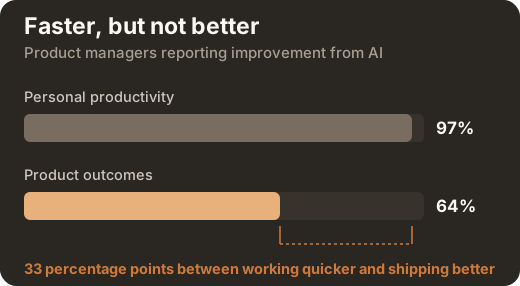
97% of product managers say AI made them faster.
Only 64% say it made their product better.
Two guides on closing that gap, one for product managers and one for product owners. Every number was traced back to the organisation that published it: Product Focus, the Scrum Guide, Microsoft's own documentation. Nothing is estimated, and there is no sales pitch anywhere in either guide.
Written by Alesia Kunz, CEO of LearnSlice, after 17+ years as a product manager and product owner. The field notes throughout are hers.
- 01 Which Copilot tier can actually see your work, and why most people have the wrong one
- 02 Where AI genuinely helps in a product week, and where it cannot
- 03 Prompts you can paste today, with the four parts that make them work
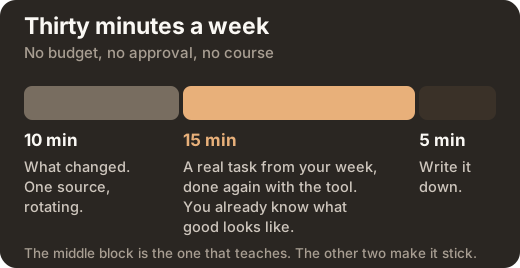
- 04 A thirty minute weekly routine that needs no budget and nobody's approval
Get the guide
The download opens straight away. We do not email you the file.
Here it is
Download the PDFKeep the link. It does not expire, and forwarding it to a colleague is fine by us.
AI for product managers: discovery, prioritisation, updates
AI does two things in a product week. It changes how fast you produce work, and it changes what you decide. Only the second moves the product, which is why 97% of product managers report better personal productivity and only 64% report better product outcomes. Sharpening the questions before a customer interview beats drafting faster. The guide covers five places the week goes wrong, and names what the tool cannot do in each.
AI for product owners: refinement, ordering, sprint goals
The product owner guide follows the five accountabilities the Scrum Guide names as yours: writing items, refining them, ordering them, proposing the value of a sprint, and showing what changed. AI backlog refinement works on the parts you should have settled before the session. It will list the questions a developer would ask before picking an item up, and draft acceptance criteria that are testable rather than a restatement of the title. It cannot order your backlog and it cannot decide what is valuable. That judgment is the job, and writing a good user story stays teamwork.
Why Copilot cannot see your backlog
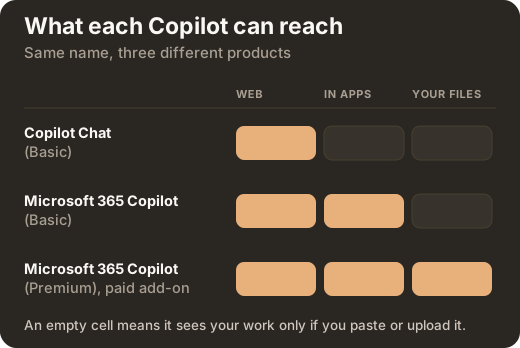
Two sources feed any answer: the public web, and your organisation's own content. Only the premium tier reaches the second by itself. If your backlog lives in Jira or Azure DevOps, no tier reads it automatically. Most people who think Copilot is useless are on a licence that cannot read their work, which is a licensing fact rather than a skill problem. Both guides give the tier table.
AI prompts for product managers and product owners
Microsoft's own prompt framework has four parts: goal, context, expectations and source. Both prompt packs are written that way and are copyable as they stand, with the parts you change marked. No prompt returns finished work. Each returns something you still have to decide on, which is the point.
Learn it here, then apply it
LearnSlice is a learning company that builds with AI. Teaching people to use these tools well is the work here rather than a wrapper around it, which is why the guides are free and complete and there is nothing to buy in order to use them. They are written by Alesia Kunz, our CEO, after 17+ years as a product manager and product owner.
They are built to be applied, not read. Every chapter ends with a first step you can take this week, and Part 4 is a thirty minute weekly routine that costs nothing and needs nobody's approval. Do it on your own real work, which is the only way to tell whether the output is any good.
If you want to go further, four routes exist and each one starts with you. Send a question to info@learnslice.com and Alesia answers it. Apply to the AI academy, which runs this across a team with content matched to your sector and a record of who learned what. Ask us to build your own academy, on your content and your brand. Or bring an AI engineering project, if the real problem is that your tools cannot read your tickets and documents.
Downloading starts no sales sequence, and nothing is emailed to you that you did not ask for. If you want a conversation, you start it.
Common questions
Can Microsoft Copilot see your Jira tickets?
If your backlog lives in Jira or Azure DevOps, no tier of Copilot reads it automatically. Microsoft publishes connectors for Jira and Confluence, but an administrator has to deploy them and they enforce the source system's own permissions. A connected source is not the same as a readable project.
What is the difference between Copilot Chat and Microsoft 365 Copilot?
Copilot Chat on the basic tier reaches web data only. It sees your work if you paste it, upload it, or have it open in Teams or Outlook. Microsoft 365 Copilot additionally works inside Word, Excel, PowerPoint and OneNote. Only the paid Premium add-on reaches your own files and mail by itself, through Microsoft Graph, and only for files you already have permission to open.
Why does Copilot give a different answer to the same prompt?
Microsoft states in its own guidance that using the same prompt several times can return different responses. That is how the technology works, not a fault. The consequence people miss is that one good answer does not prove the prompt was good. Keep a prompt only once it has produced a usable answer more than once, on different inputs.
What should a product manager never paste into an AI tool?
Three questions settle it in a second. Which account am I signed into, work or personal? Would I put this in an email to a supplier? Is it someone else's personal data, such as customer names, recordings, or support tickets with identities in them? Your own company policy overrides all three.
Are the guides free, and do you email the file?
They are free and the download opens straight away. We do not email the file to you. The form asks one question about which kind of help would actually be useful, and your answer decides nothing about the download.