
AI Backlog Refinement When Copilot Cannot Read Your Jira
You asked Copilot what the team agreed about an epic, and it told you nothing useful. You asked it to refine an item, and it answered about a product that is not yours. The conclusion most people draw at that point is that the tool is overrated.
It is more likely that you are on a licence that cannot read your work.
That distinction decides everything else, so it is worth two minutes before any prompt advice. This is for product owners in organisations running Microsoft 365, which is most of them.
Why Copilot Cannot Read Your Backlog
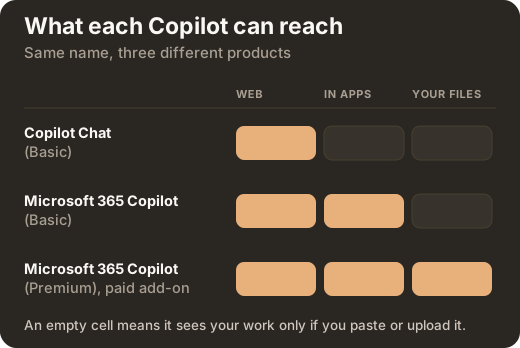
Two sources feed any answer a Copilot gives you: the public web, and your organisation’s own content. Which of the two it can reach depends entirely on your licence.
| Tier | Can it see your files and mail |
|---|---|
| Copilot Chat (Basic) | No. Web data only. It sees your work if you paste it, upload it, or have it open in Teams or Outlook |
| Microsoft 365 Copilot (Basic) | Not in chat, but Copilot works inside Word, Excel, PowerPoint and OneNote |
| Microsoft 365 Copilot (Premium), the paid add-on | Yes, automatically, through Microsoft Graph, and only for files you already have permission to open |
Two products share the word Basic, which is where most of the confusion starts. If you have asked Copilot what was decided in a refinement session and got nothing useful, that is a licensing fact rather than a skill problem.
There is a second gap underneath the first. Your backlog probably is not in Microsoft 365 at all. If it lives in Jira or Azure DevOps, no tier of Copilot reads it automatically. Microsoft does publish connectors for Jira Cloud and Confluence, but an administrator has to deploy them, and they enforce the source system’s own permissions. A connected source is not the same as a readable project.
You can check what your own licence exposes under Copilot Chat, then Settings, then Sources. The catch worth knowing in advance is that even where Jira or Confluence shows up there as an available source, Copilot often still cannot pull data from your particular project. In practice that means product owners and business analysts copy the ticket in by hand.
Which turns out to be fine. Everything below works on any tier, because you supply the content.
Not sure which Copilot licence you are on?
The free guide for product owners settles it in one table, then gives you the prompt pack and works through all five accountabilities one at a time. The download opens straight away and we do not email you the file.
What AI Backlog Refinement Actually Does
Search results on this subject promise that AI will refine your backlog. It will not. What it does is narrower and more useful than that: it clears the work you should have settled before the session, so the session reaches the questions worth having.
Three jobs are worth handing over, and together they are what AI backlog refinement honestly amounts to.
Listing the questions a developer would ask before picking an item up. This is the fastest way to find what you left out, and it costs about a minute. Anything on the list you cannot answer goes into refinement as a question for the team, rather than being discovered there.
Proposing splits for an item that is too large. You then accept or reject them. The value is in seeing three options rather than defending the first one you thought of, and in being told which split the model would not recommend and why.
Drafting acceptance criteria that are testable. Most rejected user stories come back because the criteria restate the title in different words. A model is good at spotting that, and good at producing the boring, checkable version.
Notice what is common to all three. Each returns something you still have to decide on. None of them produces a finished backlog item, and a tool that claimed to would be selling you the part of the job that is actually yours.
What To Paste, And What Must Never Go In
Among workplaces already using generative AI, 27% give their people any training in it and only 21% have written down any rule for using it. That gap, not the technology, is where most of the risk sits.
Three questions settle almost every case, and you can answer them in a second.
- Which account am I signed into? Work identity, or personal. When you are signed in with a work account, Microsoft states that prompts and responses are covered by enterprise data protection and are not used to train the foundation models. A personal account is a different product with different terms. If you are not certain which you are in, check before you paste anything that matters.
- Would I put this in an email to a supplier? If not, it does not go into a chat window either.
- Is it someone else’s personal data? User research recordings, support tickets with names in them, anything out of a customer system. Anonymise it or do not paste it.
Your company’s own policy overrides all three. If it has one, read it once, properly. If it does not, ask whoever would own it, because the absence of a rule is not permission.
This is practical guidance rather than legal advice.
The Four Part Prompt Microsoft Wrote
Microsoft publishes a prompt structure in its own guidance and almost nobody uses it. It has four parts: goal, context, expectations, and source.
A thin prompt, which is what most people type:
Refine this user story.The same request with four parts:
Goal: list the questions a developer would ask before starting the backlog
item below.
Context: [product], [team], the item is meant to fit inside one sprint.
Expectations: the questions only, ordered by how much they would change the
estimate, each tagged days, hours or unknown for how much the answer would
move it, so I can check the order. Do not answer them and do not rewrite the
item.
Source: only the item below.

[paste the item]
The second is not more clever. It is more specific about what you already know, and the last line is the one that matters most on a basic tier: naming the source stops the model reaching for the public web when you wanted it to work from your text.
For acceptance criteria, the same structure:
Goal: draft acceptance criteria for the story below.
Context: [product]. The team rejects criteria that restate the title.
Expectations: each criterion must be checkable by someone who did not write
the story, and must name the observable result rather than the
implementation. Mark any criterion you cannot write without inventing a rule
I have not given you.
Source: only the story below.

[paste the story]
That final instruction, marking what it cannot write without inventing, is worth adding to every prompt you keep. It converts a confident guess into a visible gap.
One Good Answer Does Not Prove A Good Prompt
Microsoft states plainly that using the same prompt several times can return different responses. That is how the technology works rather than a fault, and the consequence is one most people miss.
A prompt is only worth keeping once it has produced a usable answer more than once, on different inputs. Save the ones that pass, with the parts that change marked in square brackets, wherever your team already looks. Nine in ten organisations using generative AI are running on freely accessible tools, which means nobody is saving your prompts for you.
What AI Cannot Do In Refinement
Every section above describes preparation. AI backlog refinement stops there, because the accountabilities themselves do not move.
It cannot order your backlog. A model that has never met your users, does not know how much change your organisation can absorb, and has not sat in the conversation is guessing, fluently. The Scrum Guide places ordering with the product owner, who may delegate the work but remains accountable, and who is one person rather than a committee. Use AI to test an order you already hold. Never to produce one.
It cannot decide what is valuable. It can make you articulate the goal before the meeting, so you arrive with a sentence instead of a list. That is a real gain and a different thing.
It cannot create shared understanding. A polished story handed to a team that was not part of writing it is fast and worse. The conversation is the point of refinement, and the artefact is the residue.
It cannot know why the item matters. That is the part you supply, and it is the part that makes the item worth building at all.
There is also a failure mode worth naming, because it is the easiest thing to do with these tools and the least useful: generating backlog items in bulk. Volume is not value. Every item you add is something the team has to read, estimate and eventually delete.
Thirty Minutes A Week
The training gap is not going to close by waiting for a course. On the OECD’s count, between 0.3% and 5.5% of the training actually on offer across Australia, Germany, Singapore and the United States carries any AI content, and most of that aims at specialists rather than at the people who simply need to use the thing.
So here is a routine that costs nothing and needs nobody’s approval.
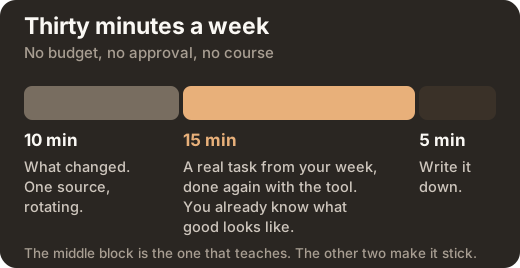
Ten minutes, what changed. One source, rotating, not all of them. Microsoft’s release notes for Copilot, the model providers’ own release notes, the Scrum Guide when a version lands.
Fifteen minutes, on your own real work. Take something you did this week, a split, an item, a sprint goal, and do it again with the tool. Not an exercise. The actual work, where you already know what good looks like. This is the only way to judge whether the output is any good, and it is why learning on your own work beats any course.
Five minutes, write it down. One line in your saved prompts: what worked, what did not.
Three weeks of that and you will know more about what these tools do in your context than any article can tell you, including this one.
The Longer Version Is Free
We wrote all of this out properly: one guide for product owners, one for product managers. The full prompt pack, the five accountabilities one at a time, the tier table, and every source listed. Free, and the download opens straight away.
AI guides for product managers and product owners
Practical, ready to apply, and built to improve your daily work. Thirty minutes a week is enough to start. We do not email you the file, and downloading starts no sales sequence.
Where This Came From
Every source was read at source rather than taken from a summary of it, and every link below was checked on 17 September 2026.
- Microsoft product documentation, for the licence tiers, grounding, enterprise data protection and prompt structure: Microsoft 365 Copilot overview. For the connectors, and for the fact that an administrator must deploy them and they enforce the source system’s own permissions: Jira Cloud connector overview.
- The Scrum Guide, by Ken Schwaber and Jeff Sutherland, for everything about what a product owner is accountable for: scrumguides.org. Licensed under Creative Commons Attribution ShareAlike 4.0.
- IAB-Betriebspanel 2025, the establishment panel run by the research institute of the German Federal Employment Agency, for the training, written-rules and freely-accessible- tools figures, published as IAB-Kurzbericht 8 of 2026.
- OECD, for how little available training carries any AI content: Bridging the AI skills gap, April 2025.
We are not affiliated with Microsoft, the IAB, the OECD or Scrum.org.
Written by
Alesia Kunz
CEO, LearnSlice